

When a plugin update breaks your site or removes a feature you rely on, knowing how to download old version of WordPress plugin becomes essential. This guide walks you through reliable methods to retrieve previous releases, ensuring you can revert safely without compromising security. By following the steps below, you’ll regain control over your WordPress functionality in minutes.
How to Download Old Version of WordPress Plugin: Using the Official Repository
The WordPress Plugin Directory hosts every version ever submitted, making it the safest source for legacy files. First, navigate to the plugin’s page on wordpress.org/plugins and locate the “Advanced View” section.
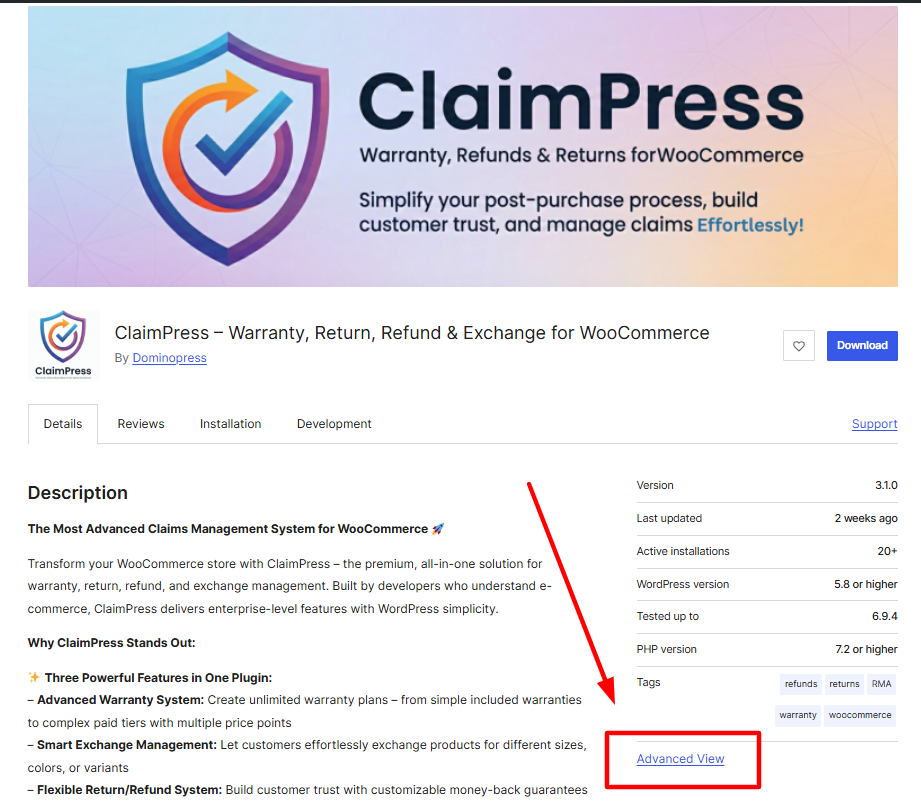
There you’ll find a dropdown labeled “Available versions” that lists all prior releases.
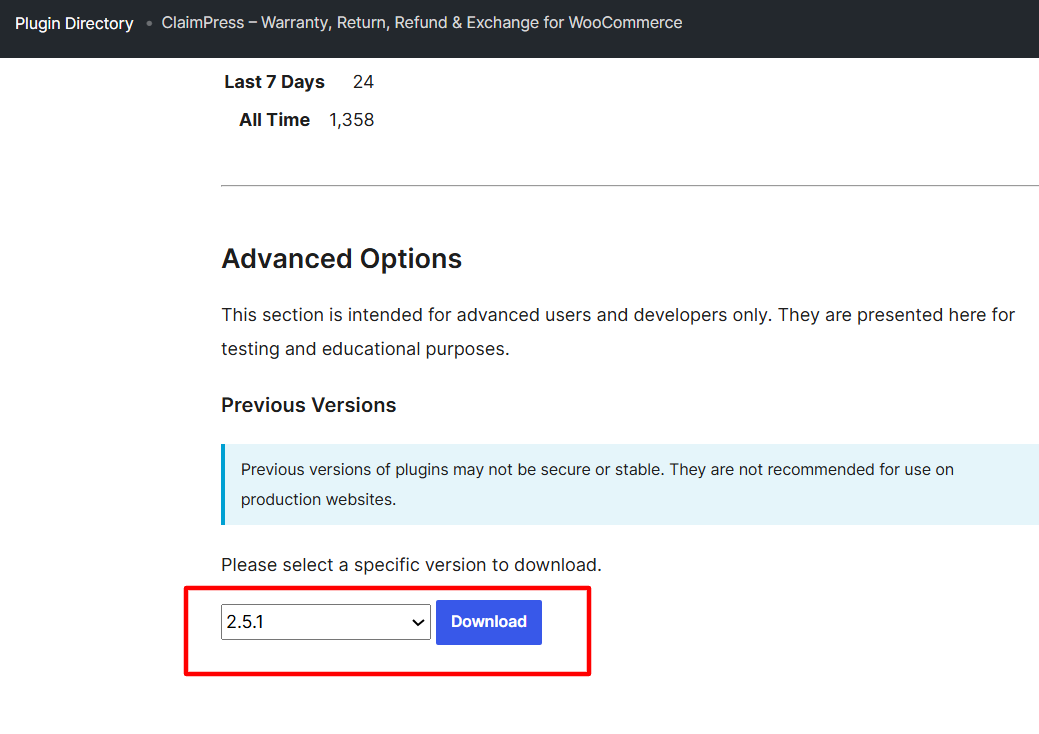
In addition, each version includes a download button that serves the exact how to download old version of WordPress plugin file you need. Clicking it saves a zip archive to your computer, which you can then upload via the Plugins → Add New → Upload Plugin interface. This method guarantees the file originates from the trusted WordPress repository.
Furthermore, the repository provides a changelog for each version, helping you confirm that the older release resolves the issue you face. Always review the changelog before proceeding to avoid reinstalling a problematic build.
How to Download Old Version of WordPress Plugin: Via WP-CLI Commands
Developers and sysadmins often prefer the command line for speed and automation. WP-CLI includes a built‑in command to install specific plugin versions: wp plugin install plugin-slug --version=1.2.3. Replace plugin-slug with the plugin’s directory name and 1.2.3 with the desired version number.
Consequently, you can retrieve the exact how to download old version of WordPress plugin archive directly from the command line without manual browsing. The command also handles verification and activation in one step, reducing the chance of human error.
However, ensure WP‑CLI is installed and you have SSH access to your server. If you’re on a shared host that restricts CLI access, revert to the repository method described earlier.
Alternative Methods: Manual Download from GitHub or Developer Site
Some premium or custom plugins are not hosted on wordpress.org. In those cases, the developer’s GitHub repository or official website often archives older releases. Look for a “Releases” or “Tags” section where each version is packaged as a zip file.
When you locate the appropriate tag, download the zip and install it via the WordPress admin panel. This approach still answers the question of how to download old version of WordPress plugin for plugins that bypass the official directory.
In addition, verify the authenticity of the file by checking the developer’s signature or comparing SHA‑256 hashes if provided. Security should never be sacrificed for convenience.
How to Download Old Version of WordPress Plugin: From GitHub Releases
Many open‑source developers tag each release on GitHub, making it straightforward to fetch a prior build. Open the plugin’s repository, click “Releases,” and select the version you need. The associated zip file contains the exact codebase for that release.
After downloading, navigate to Plugins → Add New → Upload Plugin in your dashboard and upload the zip. WordPress will unpack and activate the plugin, effectively completing the how to download old version of WordPress plugin process.
Furthermore, keep an eye on the repository’s issue tracker; sometimes developers note known bugs in specific tags, helping you avoid reinstalling a problematic version.
Best Practices When Rolling Back Plugins
Downgrading a plugin can introduce compatibility issues with your current WordPress core or other plugins. Before proceeding, create a full site backup using a reliable backup solution or your hosting provider’s snapshot feature.
Next, deactivate the current plugin version to prevent conflicts during the upload. Upload the older version, then activate it and test critical functionality thoroughly. If any errors appear, consult the plugin’s support forum or consider contacting the developer.
Additionally, monitor your site’s error logs after the rollback. Unexpected PHP warnings often surface when older code interacts with newer WordPress APIs, allowing you to address issues proactively.
Common Pitfalls and How to Avoid Them
One frequent mistake is downloading a nulled or pirated version from unverified sources. Such files may contain malware or backdoors that jeopardize your site’s security. Always stick to the official repository, GitHub releases, or the developer’s authorized site.
Another pitfall involves ignoring dependency requirements. Some older plugins rely on specific PHP extensions or library versions that may differ from your server’s configuration. Verify compatibility before installation to avoid fatal errors.
Finally, neglecting to update WordPress core after a downgrade can lead to mismatched expectations. While you may hold off on updating the problematic plugin, keep the core system current to benefit from security patches and performance improvements.
By following the outlined steps and precautions, you can confidently manage how to download old version of WordPress plugin releases and maintain a stable, secure WordPress environment.


