

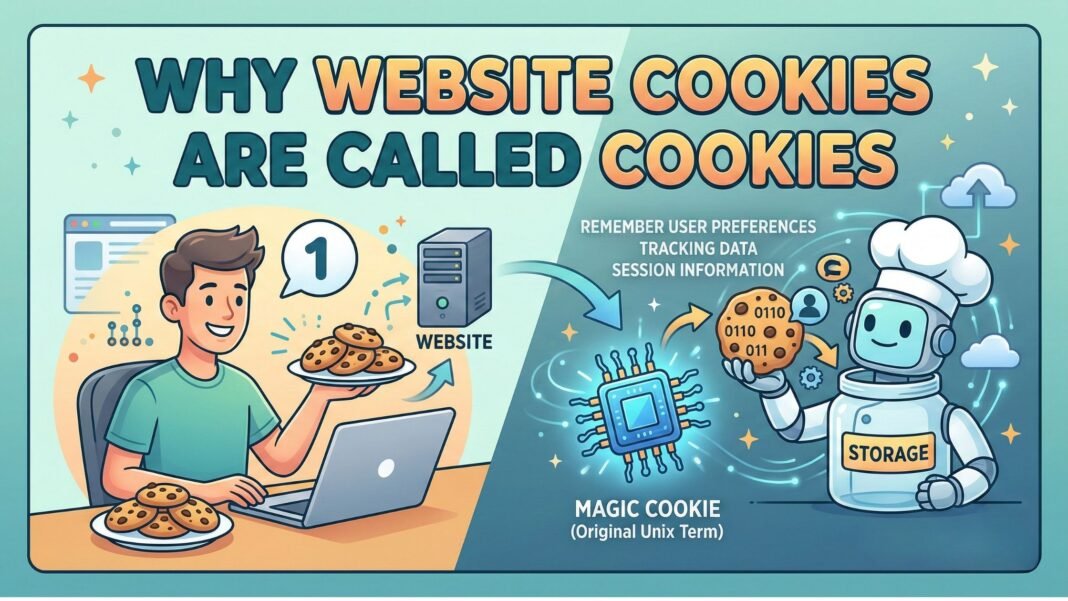
Have you ever wondered why website cookies are called cookies? It’s not a technical term born from code or data science—it’s actually a playful metaphor with roots in computing folklore. Despite their tiny size and invisible presence, cookies play a massive role in how we experience the web today. From remembering your login to personalizing ads, these small text files are everywhere. And if you’ve noticed that every website asks for cookies now, you’re not imagining things. This surge in cookie consent banners isn’t just about privacy—it’s about functionality, regulation, and user experience. In this comprehensive guide, we’ll explore the origin of the term, why websites use cookies, and why you’re seeing so many pop-ups asking for your permission.
Table of Contents
- Table of Contents
- Why Does Every Website Ask for Cookies Now?
- Key Reasons Behind the Cookie Consent Boom
- Why Are Cookies Used in Websites?
- Why Website Cookies Are Called Cookies?
- Why Do Websites Use Cookies?
- Common Uses of Website Cookies
- Why Might a Website Use Session Cookies?
- Why Do I Need Cookies on My Website?
- Why Is Every Website Asking About Cookies?
- Key Takeaways
- Frequently Asked Questions
- Are cookies dangerous?
- Can I browse the web without accepting cookies?
- Do cookies slow down my website?
Why Does Every Website Ask for Cookies Now?
The reason every website asks for cookies now is largely due to global privacy laws like the GDPR in Europe and the CCPA in California. These regulations require websites to obtain explicit consent before storing or accessing non-essential cookies on a user’s device. Before these laws, many sites used cookies silently, often without user knowledge.
Today, websites must be transparent. That’s why you see banners like “We value your privacy” or “This site uses cookies” the moment you land on a page. These notices aren’t just legal formalities—they’re part of a broader shift toward user control and data protection. Websites that fail to comply risk hefty fines and loss of user trust.
Moreover, browsers like Safari and Firefox now block third-party cookies by default, pushing websites to rely more on first-party cookies and clearer consent mechanisms. This has made cookie consent a standard part of the modern web experience.
Key Reasons Behind the Cookie Consent Boom
- Legal compliance: GDPR, CCPA, and other privacy laws mandate user consent.
- User awareness: People are more informed about data tracking and demand transparency.
- Browser restrictions: Modern browsers limit cross-site tracking, forcing sites to adapt.
- Ethical responsibility: Brands aim to build trust by being open about data use.
Why Are Cookies Used in Websites?
Cookies are used in websites for a variety of essential functions—both technical and commercial. At their core, they help websites remember information about users, making interactions smoother and more personalized. Without cookies, every visit to a site would feel like the first time: you’d have to log in repeatedly, reselect preferences, and lose items in your shopping cart.
There are two main types of cookies: session cookies and persistent cookies. Session cookies are temporary and deleted when you close your browser, while persistent cookies remain on your device for a set period or until manually deleted.
Websites use cookies to:
- Keep users logged in across pages
- Remember language or theme preferences
- Track user behavior for analytics
- Deliver targeted advertising
- Improve site performance and security
For example, when you add items to an online shopping cart, a cookie stores that information so it’s still there when you proceed to checkout. Similarly, news sites use cookies to remember your reading preferences or subscription status.
Why Website Cookies Are Called Cookies?
The term “cookie” might seem odd for a digital data file, but its origin is both whimsical and rooted in computing history. The name comes from the concept of a “magic cookie,” a term used in early Unix systems to describe a token passed between programs. These tokens contained data that one program could give to another, which would later return it—much like how a website sends a cookie to your browser, which sends it back on future visits.
The analogy is simple: just as a child might leave a cookie as a token of goodwill, a website leaves a small data packet (a cookie) on your device to recognize you later. The term was popularized in the mid-1990s by Lou Montulli, a developer at Netscape, who is credited with creating the first web cookie. He chose the name because it was familiar to programmers and had a friendly, non-threatening connotation.
Interestingly, the word “cookie” itself has been used in computing since the 1960s, long before the web existed. It was a metaphor for any small piece of data exchanged between systems. When applied to the internet, it stuck—partly because it was catchy, and partly because it avoided technical jargon that might confuse average users.
Why Do Websites Use Cookies?
Websites use cookies for both functional and strategic reasons. On a basic level, they enable core website features that users expect—like staying logged in or saving items in a cart. On a deeper level, they support business goals like marketing, analytics, and user engagement.
For instance, e-commerce platforms rely heavily on cookies to track user journeys, recommend products, and recover abandoned carts. Without cookies, personalized shopping experiences would be nearly impossible. Similarly, content platforms use cookies to show relevant articles or videos based on past behavior.
From a technical standpoint, HTTP is a stateless protocol—meaning each request to a server is independent. Cookies solve this by storing state information on the client side. This allows websites to maintain continuity across pages and sessions.
In short, cookies are the glue that holds modern web experiences together. They make the internet feel responsive, personalized, and efficient.
Common Uses of Website Cookies
- Authentication: Verifying user identity after login
- Personalization: Remembering settings like language or layout
- Analytics: Collecting data on page views, clicks, and user paths
- Advertising: Delivering targeted ads based on browsing history
- Security: Detecting suspicious activity or preventing fraud
Why Might a Website Use Session Cookies?
A website might use session cookies to manage user activity during a single browsing session. These cookies are temporary and exist only while the browser is open. Once you close the tab or window, the session cookie is deleted.
Session cookies are crucial for security and functionality. For example, when you log into your email or bank account, a session cookie keeps you authenticated as you navigate between pages. Without it, you’d have to re-enter your password every time you clicked a link.
They’re also used in online forms to preserve data if a user refreshes the page or goes back. Imagine filling out a long application and losing all your progress—session cookies prevent that frustration.
Because session cookies don’t persist after the browser closes, they’re generally considered safer than persistent cookies. They reduce the risk of unauthorized access and are less likely to be exploited for long-term tracking.
However, they still require careful handling. Websites must ensure session cookies are encrypted and tied to secure connections (HTTPS) to prevent hijacking.
Why Do I Need Cookies on My Website?
If you run a website, cookies aren’t just optional—they’re often essential. Whether you’re managing a blog, an online store, or a corporate site, cookies help deliver a better user experience and support key business functions.
For example, if you offer user accounts, cookies enable login persistence. If you sell products, they help manage shopping carts. If you analyze traffic, cookies provide insights into visitor behavior.
Even simple features like remembering a user’s preferred language or dark mode setting rely on cookies. Without them, your site would feel clunky and impersonal.
From a business perspective, cookies also support monetization. If you use ads or affiliate links, cookies help track conversions and attribute sales. This data is vital for optimizing revenue and measuring campaign success.
Of course, with great power comes great responsibility. You must inform users about cookie usage and obtain consent where required. But when used ethically, cookies are a powerful tool for engagement and growth.
Why Is Every Website Asking About Cookies?
The reason every website is asking about cookies boils down to a perfect storm of regulation, technology, and user expectations. Privacy laws have raised the bar for transparency, while browser updates have limited tracking capabilities. As a result, websites must now ask for permission upfront.
Before GDPR (2018), many sites used cookies without clear consent. Users had little awareness of how their data was being collected or used. Today, that’s no longer acceptable. Websites must explain what cookies do, why they’re used, and give users a choice—accept, reject, or customize.
This shift has led to the rise of cookie consent managers—tools that let users toggle different cookie categories (e.g., functional, analytics, marketing). These tools help websites comply with the law while still collecting valuable data—if users allow it.
Additionally, search engines like Google now favor sites that respect user privacy. Sites with clear cookie policies and strong data practices may see SEO benefits, including better rankings and higher trust scores.
In essence, cookie consent banners are here to stay. They represent a new standard for digital ethics and user empowerment.
Key Takeaways
- The term “cookie” comes from “magic cookie,” a computing concept from the 1960s, later adopted by web developers for its simplicity and friendliness.
- Websites use cookies to remember user actions, personalize experiences, and support core functions like logins and shopping carts.
- Session cookies are temporary and enhance security by managing user sessions without long-term storage.
- Modern privacy laws like GDPR require websites to ask for cookie consent, explaining why every website asks for cookies now.
- Even if you run a small site, cookies can improve usability, analytics, and engagement—when used responsibly.
- Cookie consent banners are not just legal requirements—they’re opportunities to build trust with your audience.
Frequently Asked Questions
Are cookies dangerous?
Not inherently. Most cookies are harmless and improve your browsing experience. However, third-party tracking cookies can be used for invasive advertising or data collection. Using privacy tools and adjusting browser settings can help you control what’s stored.
Can I browse the web without accepting cookies?
Yes, but with limitations. Many sites will still work, but features like logins, carts, and personalized content may not function properly. Some sites may restrict access until you accept essential cookies.
Do cookies slow down my website?
Generally, no. Cookies are small text files and have minimal impact on performance. However, excessive or poorly managed cookies—especially third-party ones—can increase load times and affect user experience.
Understanding why website cookies are called cookies—and why they matter—helps demystify one of the internet’s most misunderstood technologies. From their quirky name to their critical role in modern web design, cookies are more than just digital crumbs. They’re the silent partners behind seamless, personalized, and secure online experiences. As privacy evolves, so will cookie usage—but their core purpose remains: to make the web work better for everyone.


