

Boost your average order value by offering paid warranty options as easy add-ons. ClaimPress – Warranty, Return, Refund & Exchange for WooCommerce (by DominoPress) lets you create paid warranties with multiple tiers directly in the free version, and Pro extends this with unlimited tiers, custom marketing labels, and automatic upsell presentation at WooCommerce checkout for higher conversions.
Download the plugin for free from https://wordpress.org/plugins/claimpress-warranty-refunds-returns-for-woocommerce/ to get started with paid warranty tiers right away. Here’s how to set up paid warranties, add multiple tiers, and encourage upsells during purchase.
Step 1: Install and Activate ClaimPress
- Go to your WordPress dashboard → Plugins > Add New.
- Search for “ClaimPress – Warranty, Return, Refund & Exchange for WooCommerce”.
- Install and activate it from the official WordPress repository: https://wordpress.org/plugins/claimpress-warranty-refunds-returns-for-woocommerce/.
- Flush permalinks (Settings > Permalinks > Save Changes) to ensure everything works smoothly.
Step 2: Enable Paid Warranty on Your Products
- Navigate to Products → Edit a product (or bulk edit for multiple).
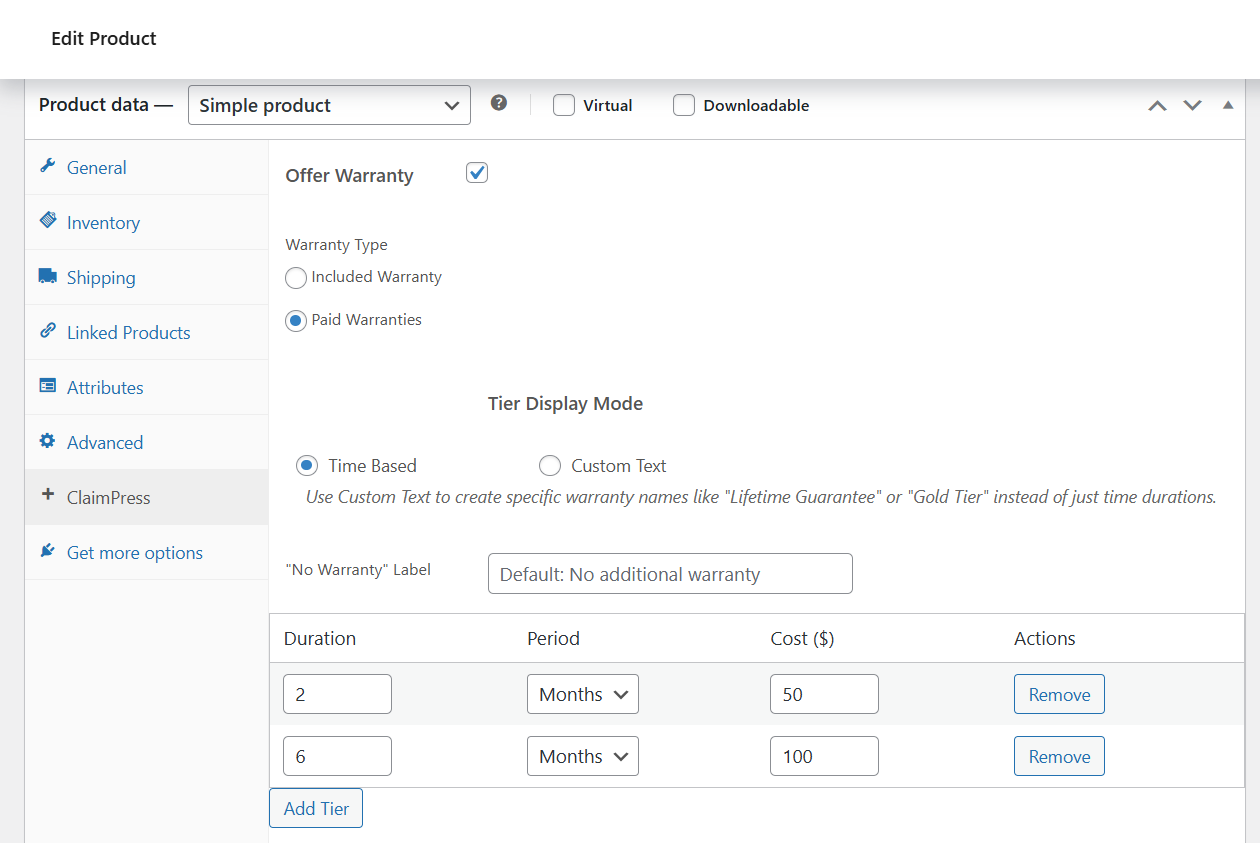
- In the Product Data metabox, switch to the ClaimPress tab.
- Check the box to Enable Warranty.
- Select the warranty type: Paid to offer tiers with different prices (you can also combine with a free “Included” base warranty if desired).
- Update/save the product — the warranty options are now active.
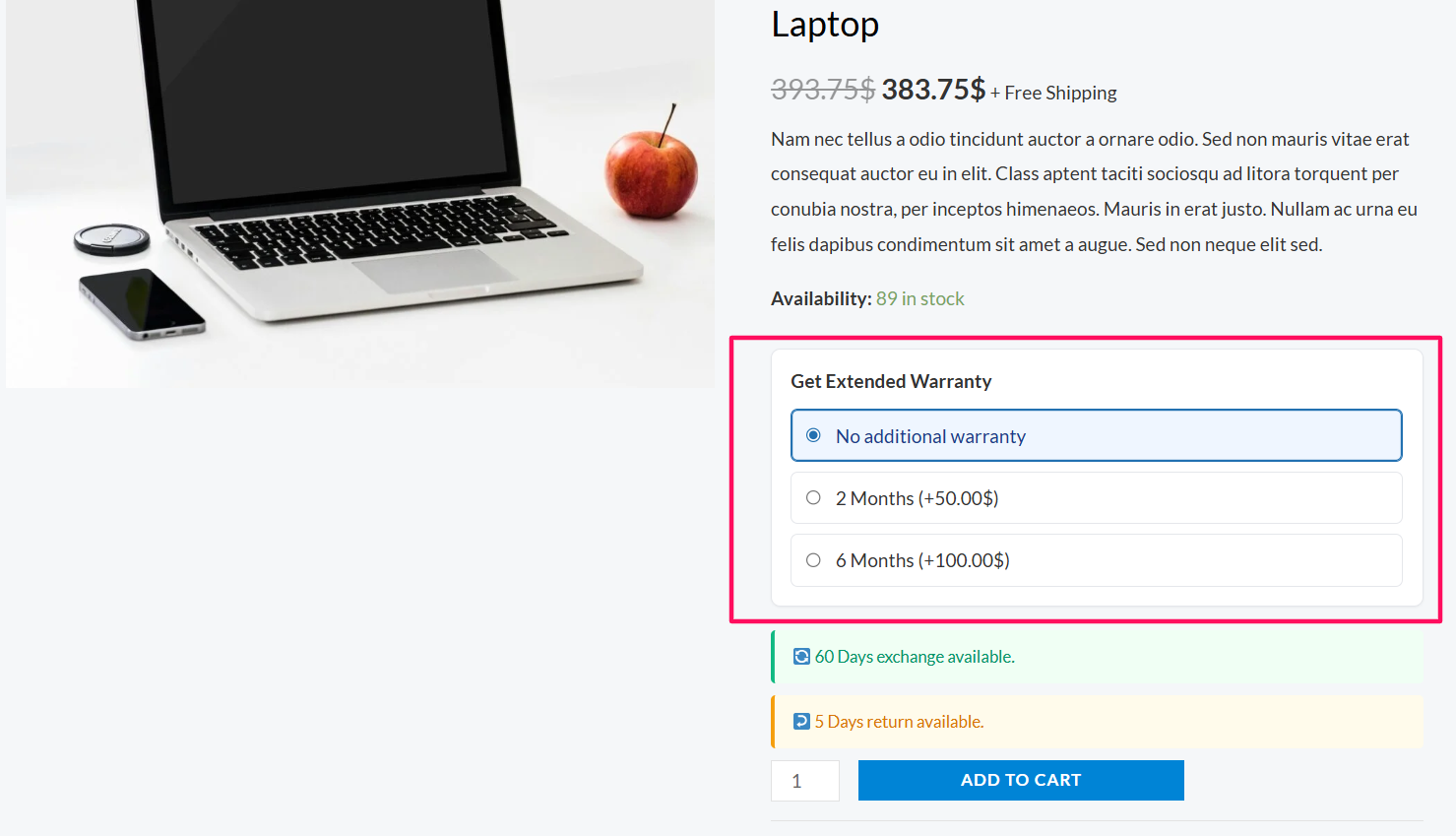
Repeat for all products where you want to sell extended protection. Paid warranties appear on the product page for customers to see and select before adding to cart.
Step 3: Add Multiple Paid Warranty Tiers
- In the same ClaimPress tab (after enabling Paid warranty), find the tiers section.
- Add your warranty tiers — the free version supports multiple tiers per product:
- Example Tier 1: 1-Year Coverage – $5
- Example Tier 2: 3-Year Extended – $10
- Example Tier 3: Lifetime Protection – $20 (Pro allows unlimited if you need more)
- For each tier, set:
- Duration: Number + period (e.g., 12 Months, 3 Years, Lifetime)
- Price: Flat fee that adds to the cart total when selected
- Save the product — customers can now choose a tier on the product page or during purchase.
The selected warranty fee adds to the order total seamlessly, just like any product variation or add-on.
Step 4: Upsell Warranties at Checkout (Enhanced in Pro)
In the free version, paid warranty tiers are selectable on the product page and carry through to cart/checkout with proper price calculation (improved in recent updates for custom themes and mini-carts).
- Customers see the tiers on the product page and choose one before adding to cart.
- The fee integrates into WooCommerce cart and checkout totals automatically.
For even stronger upsells, ClaimPress Pro displays and lets customers add/upgrade warranty tiers directly at checkout (e.g., “Add Lifetime Protection for $20?”), capturing last-minute decisions. Pro also unlocks unlimited tiers and custom marketing labels like “Gold Protection Plan” instead of plain durations for better appeal.
Step 5: Test and Optimize Your Warranty Upsells
- Test the flow: Add a product with paid tiers to cart → View cart/checkout → Confirm the warranty fee adds correctly and order processes.
- Highlight benefits: Add warranty details to your product descriptions, images, or a dedicated section to encourage selection early.
- Monitor in WooCommerce reports: Warranty fees show as line items or add-ons for easy tracking.
- If you need more tiers or checkout-specific upsells, consider upgrading to Pro via the developer’s site for unlimited options and advanced display.
Quick Benefits & Tips
- Extra revenue: Paid warranties are high-margin add-ons with no extra fulfillment costs
- Customer trust: Clear protection options reduce post-purchase hesitation
- Flexible setup: Multiple tiers per product in free version; unlimited in Pro
- No coding needed: Configure everything in the product editor and settings
- Display clearly: Mention warranty tiers prominently on product pages to drive selections
ClaimPress makes paid warranties simple to implement and profitable from day one. Start with the free plugin at https://wordpress.org/plugins/claimpress-warranty-refunds-returns-for-woocommerce/, add tiers to your top products, and watch the extra revenue roll in. For advanced features like unlimited tiers and dedicated checkout upsells, check the Pro upgrade on the developer’s site.


